
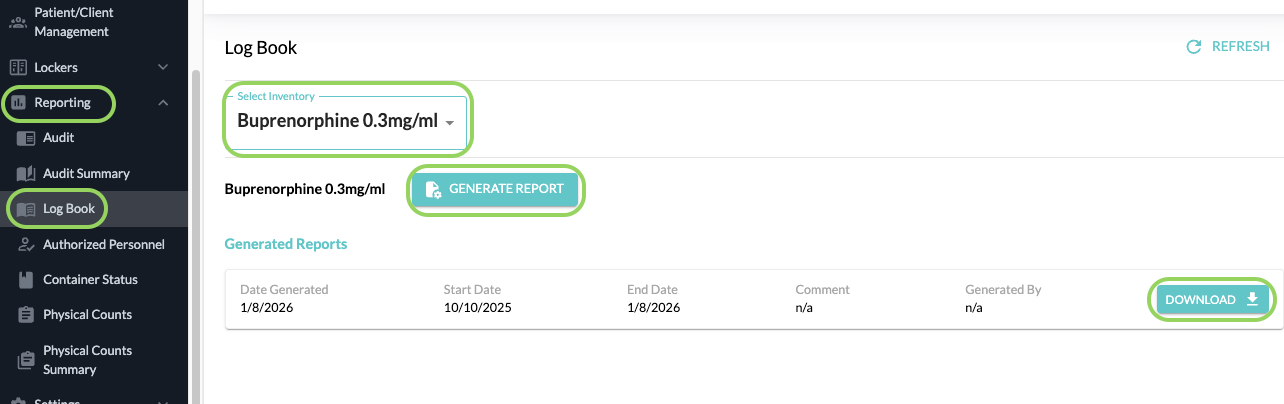
You will now find a dedicated LogBook tab within the Reports section.
When you select “Download PDF” from your logbook screen, you will be redirected to this new Reports page. This page will allow you to generate a new Logbook report and also view previously generated reports, similar to the Audit report.
You can select All Drugs or a specific drug from the dropdown menu and click on Generate Report.
You will then enter a custom date range. A comment and a signature is now also required when generating a logbook PDF.
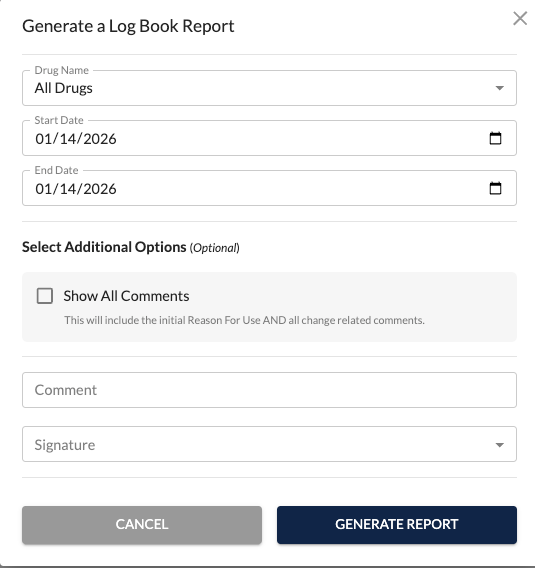
Your previous Logbook PDF options (drug, date range, etc.) will still be available.
Privileged and confidential. For VetSnap approved use only. Copyright © VetSnap Corporation. All rights reserved. Not to be distributed, reproduced, modified, or used to create derivative works without explicit written permission from VetSnap Corporation. VetSnap is not a DEA consultant and does not provide legal or regulatory advice regarding controlled substances.