
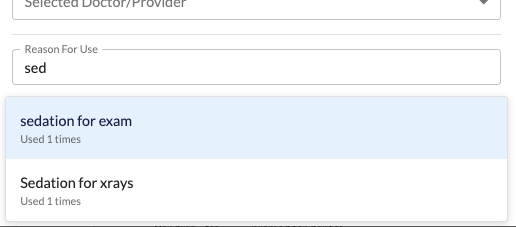
At popular request, there is now an option to autofill comments for logging and restocks!
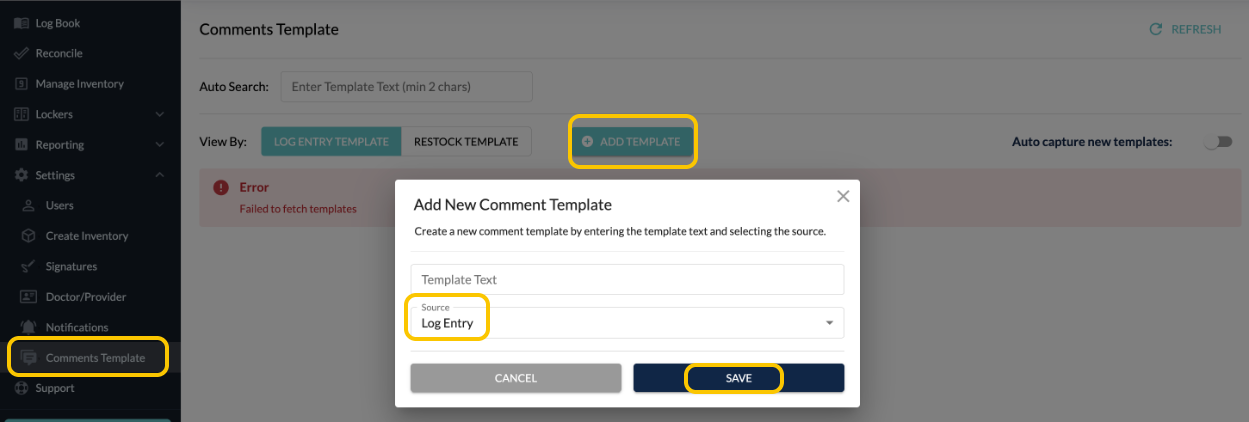
This new feature can be set up from an admin account by going to Comment Template under Settings. You have 2 options.
- Autocapture New Templates
- Manually Enter Templates
To use the Autocapture New Template, you will toggle on the setting. With this feature, new templates will be created when a comment on a log entry or restock is 10 characters or more. Once added, the template will be ready for use for new entries.

The Manually Enter Template option can be used by clicking on Add Template. You will enter a comment that is at least 10 characters, select the source, and save.
Important things to note
- Templates can only be used for log entries or restocks
- The template must be at least 10 characters to save
- You will be able to search by typing at least 2 characters.
- There is a limit of 100 templates per category
Privileged and confidential. For VetSnap approved use only. Copyright © VetSnap Corporation. All rights reserved. Not to be distributed, reproduced, modified, or used to create derivative works without explicit written permission from VetSnap Corporation. VetSnap is not a DEA consultant and does not provide legal or regulatory advice regarding controlled substances.